

New 10 AI Prompts for Steampunk Cityscapes with Intricate Details
Steampunk cityscapes have long captivated artists with their blend of Victorian industrial grit and fantastical machinery. This collection of 10 AI prompts pushes that fascination further, introducing intricate details that transform urban vistas into living, breathing mechanical ecosystems. Each prompt is a doorway to a world where brass gears grind against copper pipes, and steam-powered inventions shape the skyline.
Whether you're generating hyper-realistic macro shots or surreal architectural wonders, these prompts offer a rich palette for AI image creation. From a volcano erupting inside a teacup to a floating origami pavilion, the variety ensures endless creative exploration. This article unpacks the shared scene, key elements, and practical steps to bring these steampunk visions to life using popular AI tools.
What these steampunk cityscape prompts are asking for
The prompts in this collection revolve around steampunk aesthetics fused with surreal, hyper-detailed environments. They demand images that merge industrial elements like brass, copper, and steam with organic or cosmic features, creating scenes that feel both antique and futuristic. Each prompt specifies a unique focal point, from macro shots to vast architectural interiors, ensuring a diverse range of outputs.
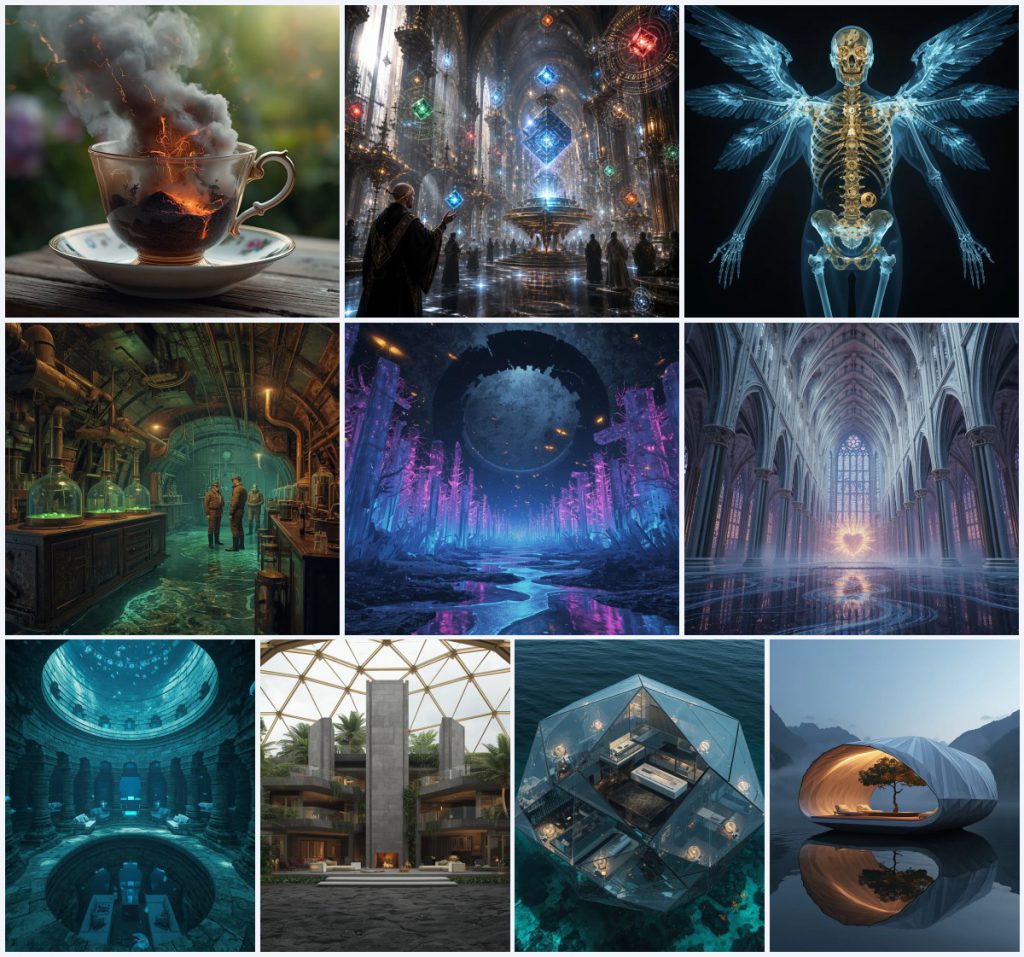
- Delicate antique porcelain teacup with a miniature erupting volcano
- Floating geometric data cubes projecting holographic lore in a gothic cathedral
- X-ray artwork revealing golden gears and fractured crystal bones in a mechanical angel
- Alchemist's lab inside a colossal mechanical whale with brass valves and steam pipes
- Bioluminescent crystal forest beneath a shattered obsidian ring
- Cathedral with bio-mechanical ribs and liquid starlight pillars
The shared scene across these steampunk cityscapes
The collection unites under a steampunk umbrella, but each prompt carves out a distinct corner of this world. One prompt describes "a delicate, highly ornate, antique porcelain teacup" with a "violently erupting, hyper-realistic miniature volcano," setting a scene of intimate chaos. Another expands to "a gargantuan, endless gothic cathedral" where "millions of perfectly smooth, floating geometric data cubes" orbit like celestial bodies, blending sacred architecture with advanced technology.
Common threads include the clash of organic and mechanical forms, as seen in "a fallen mechanical Seraphim angel" with "fractured crystal bones" and "microscopic golden gears." The environments often feature dramatic lighting, such as "glowing orange lava" or "shifting violet and indigo light," which enhances the surreal, high-stakes atmosphere. These clauses build a cohesive yet varied steampunk narrative.
Why these steampunk cityscape prompts inspire creators
These prompts tap into the timeless appeal of steampunk by combining nostalgia with innovation, offering AI artists a playground of intricate details and dramatic contrasts. The focus on hyper-realism and surrealism challenges generators to produce visually stunning, thought-provoking images that stand out in portfolios or social media feeds.
- They blend familiar steampunk materials like brass and steam with unexpected elements like bioluminescent crystals, sparking fresh creative directions.
- The intricate details, such as "microscopic bolts of lightning" and "clockwork fireflies," push AI tools to render complex textures, improving technical skills.
- Each prompt's cinematic scale, from macro teacups to vast cathedrals, offers versatility for projects ranging from concept art to storytelling.
Three artistic styles for these steampunk prompts
This collection can be interpreted through three distinct artistic styles that enhance the steampunk aesthetic. Hyper-realism emphasizes lifelike textures like rusted copper and glowing lava, making scenes feel tangible. Surrealism amplifies the fantastical elements, such as floating data cubes or mechanical whales, creating dreamlike compositions. Cinematic rendering adds dramatic lighting and depth, perfect for the grand scales of cathedrals and forests.
- Hyper-Realistic: Focus on precise details like the "intricate glass alembics" and "searing wood" to achieve a lifelike steampunk scene.
- Surreal: Amplify the unreal, such as "floating geometric data cubes" and "pulsing bio-mechanical ribs," for a dreamlike quality.
- Cinematic: Use dramatic lighting like "volumetric fog" and "golden electromagnetic energy" to create a movie-like atmosphere.
How to generate these steampunk cityscapes with AI
Start by selecting a prompt from the collection and copying its full text into your chosen AI image generator. For best results, upload a reference photo that captures the steampunk mood, such as an image of Victorian machinery or a misty cityscape. Generate the image, then carefully review the output for common flaws like distorted hands, unnatural faces, or misaligned mechanical parts, and refine with iterative edits.
- Copy the prompt. Select a prompt like the "Hyper-Realistic Macro Shot of an Erupting Volcano" and copy the full text.
- Upload a reference. Add a photo of antique porcelain or industrial gears to guide the AI's style and composition.
- Generate the image. Run the prompt in tools like Midjourney or Leonardo AI to create the initial output.
- Check hands and faces. Inspect any human figures, such as monks in "obsidian tech-robes," for anatomical accuracy.
- Check the main object. Verify key elements like the "glass teacup" or "mechanical whale" are rendered without distortion.
- Refine and iterate. Adjust prompts or settings based on flaws, then regenerate until the details align.
Choosing a reference photo for these steampunk prompts
A well-chosen reference photo can anchor the AI's interpretation, ensuring the steampunk elements feel grounded. Select images that echo the prompt's materials and lighting to enhance realism and detail.
- Use a photo of Victorian-era machinery with visible brass and copper components to mirror the steampunk aesthetic.
- Include a shot of dramatic, misty lighting to replicate the "volumetric fog" and "cinematic lighting" described in the prompts.
- Add an image of intricate textures like cracked porcelain or woven leather to guide the rendering of surfaces like the "antique porcelain teacup."
Best AI tools for steampunk cityscape prompts
Different AI tools excel at various aspects of these prompts, from realism to creative interpretation. Below is a comparison to help you choose the right platform for rendering details like the "glowing neon-blue" X-ray or the "floating origami-style paper pavilion."
| Tool | Access | Typical realism | Useful here for |
|---|---|---|---|
| ChatGPT | Free tier available | Moderate to high | Generating intricate textures like the "fractured crystal bones" in the X-ray artwork. |
| Google Gemini | Free with Google account | High | Rendering surreal scales, such as the "500-foot-wide mechanical whale" with precise lighting. |
| Leonardo AI | Free tier with credits | Very high | Producing cinematic details like the "shifting violet and indigo light" in the cathedral scene. |
| Midjourney | Paid subscriptions | Exceptional | Capturing atmospheric effects like the "bioluminescent crystal structures" in the celestial forest. |
Three tips for perfecting these steampunk images
Enhance your steampunk generations by focusing on material authenticity and atmospheric depth. These tips leverage real objects from the prompts to guide your AI settings and post-processing.
- Emphasize brass and copper tones in your color palette to match the "rusted copper plates" and "massive brass valves" in the mechanical whale prompt.
- Add steam or fog overlays in editing to replicate the "hissing steam pipes" and "dense, glowing particles" for a misty, industrial feel.
- Use high-resolution settings to capture fine details like the "microscopic golden gears" and "fiber-optic wire" in the clockwork fireflies.
Common issues with steampunk cityscape prompts
AI generators can stumble on the complex interplay of mechanical and organic elements in these prompts. Below are typical failures and how to address them for cleaner, more accurate results.
| Issue | What to change |
|---|---|
| Merged or blurry gears in the mechanical angel | Add keywords like "sharp focus on golden gears" and reduce prompt complexity. |
| Unnatural lava flow in the teacup volcano | Specify "smooth, cascading lava" and use a reference photo of molten rock. |
| Distorted floating cubes in the cathedral library | Simplify to "perfectly smooth geometric cubes" and check for clipping artifacts. |
| Flat lighting in the bioluminescent forest | Increase contrast with "rhythmic, pulsing light" and add "volumetric glow" to the prompt. |
Frequently Asked Questions
Can I mix elements from multiple prompts in this collection?
Yes, you can blend details like the "floating geometric data cubes" with the "mechanical whale" setting, but keep the prompt focused to avoid overwhelming the AI. Test combinations gradually for coherent results.
Why do some steampunk images look too cartoonish?
This often happens when the AI defaults to stylized rendering. Add terms like "hyper-realistic 8k resolution" and include reference photos with real metal textures to push for a more lifelike output.
How do I fix glowing elements that overpower the scene?
If the "glowing orange lava" or "neon-cyan LED lighting" is too bright, reduce intensity by specifying "soft, diffused glow" in your prompt, or adjust brightness in post-processing tools.
Conclusion
This collection of steampunk cityscape prompts offers a rich tapestry of intricate details, from erupting volcanoes in teacups to floating origami pavilions. By understanding the shared scene, applying the right styles, and using tools like Midjourney or Leonardo AI, you can create stunning images that push creative boundaries. Experiment with the tips and troubleshooting advice to refine your results, and don't hesitate to blend elements for unique compositions. The world of steampunk is vast and mechanical—let these prompts be your blueprint for AI-generated art that captivates and inspires.
Remember to only edit a photo you have the legal right to modify, ensuring your creative process stays ethical and respectful of original works.