

New 10 Luxury AI Prompts for Men’s High-End Lifestyle and Opulent Visuals
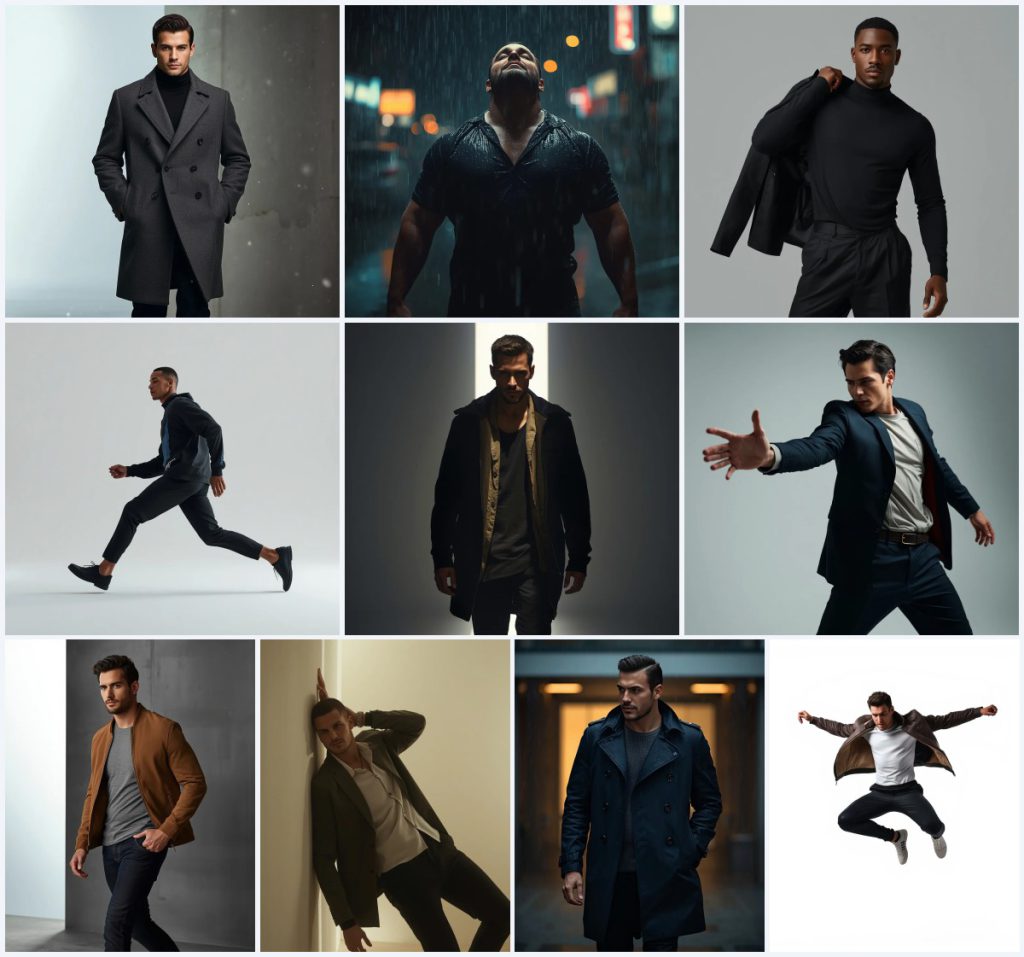
Luxury men's fashion photography has always been about more than just clothing—it's about capturing a mood, a lifestyle, and an attitude of quiet confidence. With AI image generation, you can now craft these opulent visuals without a full production crew, creating images that feel plucked from the pages of a high-end editorial magazine. This collection of ten prompts focuses on the modern man, blending cinematic lighting, premium fabrics, and powerful poses into a cohesive set of ultra-realistic portraits.
Each prompt in this series builds on a shared aesthetic: clean, minimal backgrounds, dramatic lighting, and an unwavering attention to texture, from the heavy wool of an overcoat to the glistening water droplets on a rain-soaked shirt. Whether you're aiming for a moody winter scene or a dynamic athletic jump, these prompts give you the exact language to generate images that exude masculine elegance and high-end lifestyle appeal.
What this luxury men's lifestyle collection is asking for
This collection of ten prompts calls for a series of ultra-realistic, full-body portraits of stylish, modern men in various states of motion and emotion. The shared visual language includes cinematic DSLR-style photography, 8K ultra HD resolution, and a strong emphasis on fabric texture and skin detail. Each image isolates the subject against a clean, minimal background—often a concrete wall, a seamless white backdrop, or a softly lit urban setting—to keep the focus entirely on the man, his outfit, and his expression.
- A handsome or powerful modern man in a full-body shot
- Cinematic lighting with high contrast, soft gradients, or neon reflections
- Ultra-realistic skin texture with visible pores and sharp facial details
- Premium fabrics like charcoal wool, tan suede, or midnight blue trench coat material
- A clean, minimal background such as a concrete wall, white seamless, or soft urban glow
- A calm, focused, or intensely emotional masculine expression
The shared scene across these ten prompts
Across all ten prompts, the subject exists in a carefully controlled, almost studio-like environment that feels both cinematic and editorial. The backgrounds are deliberately stripped back—"a minimal concrete wall with a soft white gradient light" appears in the overcoat prompt, while the athletic jump uses "a pure white seamless background." Even the rain scenes avoid busy cityscapes, instead using "soft, warm ambient lights from a minimal urban background" to keep the man as the undeniable focal point.
What ties these scenes together is the interplay of light and texture. In the rain-drenched silhouette prompt, "cinematic neon and street lighting reflecting off wet surfaces" creates a moody, emotional atmosphere, while the beam-of-light prompt uses "dramatic highlights and deep shadows across his body" to sculpt the figure. The falling snow in the charcoal overcoat scene is described as "light, magical snow," with cinematic lighting that highlights "the heavy texture of the wool coat and the falling snowflakes in sharp focus." Every scene is built to make the man look powerful, stylish, and untouchably cool.
Why these luxury men's prompts work so well
These prompts excel because they combine precise fashion terminology with cinematic photography language, giving the AI clear direction on mood, lighting, and texture. The focus on full-body shots and minimal backgrounds ensures the generated images feel like professional editorial spreads rather than casual snapshots. Each prompt also specifies an emotional state—"calm, focused, and masculine" or "calm yet deeply emotional"—which helps the AI render expressions that match the high-end aesthetic.
- The prompts use specific fabric names like "charcoal gray double-breasted wool overcoat" and "premium tan suede jacket" to ensure accurate material rendering.
- Cinematic terms such as "shallow depth of field," "DSLR photography," and "8K ultra HD" push the AI toward photorealism and professional camera aesthetics.
- The consistent focus on confident, relaxed body language—hands in pockets, sliding motions, extended arms—creates a cohesive collection that feels curated for a luxury brand campaign.
Three visual styles you can apply within this prompt collection
While the prompts already lean heavily into cinematic realism, you can nudge the AI toward three distinct visual interpretations without breaking the core aesthetic. These style directions keep the ultra-realistic texture and minimal backgrounds intact but shift the overall mood and finish.
- High-Fashion Editorial: Add terms like "Vogue editorial style, high-contrast black and white, dramatic shadows" to the rain or overcoat prompts for a starker, more graphic look that emphasizes form and fabric over color.
- Film Grain Cinematic: Incorporate "35mm film grain, Kodak Portra 400 color palette, subtle vintage tone" into the suede jacket or sliding motion prompts to give the images a warm, analog photography feel that still reads as luxury.
- Hyper-Clean Commercial: Use "perfectly diffused studio lighting, cosmetic-grade skin retouching, product-photography sharpness" with the athletic jump or beam-of-light prompts for a polished, advertisement-ready finish suitable for sportswear or fragrance campaigns.
How to generate these luxury men's lifestyle images
Creating these opulent visuals is straightforward with the right AI image generator. You'll need to copy the prompt exactly as provided, consider uploading a reference photo for consistent facial features, and then review the output carefully for common AI artifacts. Follow these steps to get the best results.
- Copy the full prompt. Select one of the ten prompts from this collection and copy the entire text, including all descriptive clauses about lighting, fabric, and expression.
- Upload a reference photo (optional). If you want a specific face or body type, upload a clear reference image to guide the AI, ensuring the pose and lighting match the prompt's description.
- Generate the image. Paste the prompt into your chosen AI tool and run the generation. Use a 1:1 or 4:5 aspect ratio for Instagram-ready framing, or 3:2 for a more cinematic feel.
- Check the hands. Examine the hands closely—look for extra fingers, unnatural bends, or blurred digits, especially in poses where hands are in pockets or extended sideways.
- Check the face. Inspect the facial features for symmetry, realistic skin texture, and accurate expression. The prompt specifies "visible pores" and "sharp jawline," so the result should match that level of detail.
- Check the main fabric and object. Verify that the coat, jacket, or shirt matches the prompt's material description—wool should look heavy and textured, suede should appear matte and soft, and wet fabric should cling realistically.
Using a reference photo for consistent results
A reference photo can dramatically improve the consistency of facial features across multiple generations, especially if you're building a series with the same model. Upload a clear, well-lit portrait where the subject's face is visible and the expression is neutral or matches the prompt's described emotion. The AI will use this as a guide for bone structure, skin tone, and hair, while still applying the cinematic lighting and outfit details from the text.
- Choose a reference photo with even, soft lighting and a plain background to avoid confusing the AI with competing visual elements.
- Ensure the reference subject's head angle and gaze direction are compatible with the prompt—looking ahead works best for the walking and standing poses.
- Use a high-resolution image where skin texture, pores, and facial hair are visible, as the prompts demand "ultra-realistic skin texture with visible pores."
Best AI tools for these luxury men's prompts
Different AI image generators handle realistic human subjects with varying degrees of success. The table below compares four popular tools based on their accessibility, typical realism, and specific strengths for this collection.
| Tool | Access | Typical realism | Useful here for |
|---|---|---|---|
| ChatGPT | Free and paid tiers | High, with strong prompt adherence | Rendering the heavy texture of the charcoal wool overcoat and falling snowflakes in sharp focus |
| Google Gemini | Free and paid tiers | Moderate to high, improving with detail | Capturing the cinematic neon reflections on wet surfaces in the rain-drenched silhouette prompt |
| Leonardo AI | Freemium with daily credits | Very high with fine-tuned models | Generating the soft, matte texture of the tan suede jacket and the sharp jawline in the casual luxury portrait |
| Midjourney | Paid subscription only | Excellent, often the gold standard | Producing the dramatic highlights and deep shadows across the body in the narrow beam spotlight prompt |
Three tips for getting the best luxury men's images
Small adjustments to your prompting approach can make the difference between a good image and a truly opulent one. These tips focus on the specific materials and objects named in the prompts to help you achieve that high-end editorial finish.
- Emphasize the charcoal gray wool overcoat's texture by adding "heavy fabric weave visible, soft directional light catching the wool fibers" to your prompt if the initial output looks too smooth or synthetic.
- For the tan suede jacket, request "matte finish, no shine, subtle nap texture" to avoid the AI mistakenly rendering it as glossy leather, which would break the casual luxury aesthetic.
- When generating the rain scenes, specify "individual water droplets on the midnight blue trench coat, not a uniform wet sheen" to ensure the AI creates the glistening, tactile look described in the prompt rather than a flat, wet surface.
Common issues and how to fix them
Even with detailed prompts, AI can misinterpret certain elements. Here are four common failures these prompts might produce and the adjustments you can make to correct them.
| Issue | What to change |
|---|---|
| The wool overcoat looks like smooth polyester | Add "heavy wool texture, visible weave, matte finish, no synthetic shine" and reduce any keywords that imply gloss or reflection on the fabric. |
| The rain-soaked shirt lacks the clinging, emotional effect | Strengthen the prompt with "wet fabric clinging to chest and arms, translucent in areas, heavy water saturation" and specify "not a dry shirt with water droplets on top." |
| The athletic jump pose has distorted limbs or unnatural angles | Add "anatomically correct proportions, natural human range of motion, no elongation or warping" and consider using a reference photo of a similar jump pose. |
| The face appears plastic or overly airbrushed | Include "visible pores, skin texture, natural imperfections, no beauty filter, no smooth plastic skin" to push the AI toward the ultra-realistic skin detail the prompt demands. |
Frequently Asked Questions
Can I use these prompts to create a consistent character across all ten images?
Yes, but you'll need to use the same reference photo for every generation and add a consistent facial description like "same man, strong jawline, short dark hair" to each prompt. Even then, expect slight variations and be prepared to do multiple generations per prompt to find the closest match.
Why does the rain in my generated image look like white streaks instead of droplets?
This is a common AI artifact with motion and weather effects. Add "individual sharp raindrops, no motion blur on rain, droplets visible in mid-air" to your prompt, and consider reducing the overall motion intensity in the scene description if the streaks persist.
How do I get the minimalist concrete wall background without it looking like a plain gray square?
The key is to include texture and lighting cues. Add "subtle concrete grain, soft gradient light falling across the wall, faint shadow cast by the subject" to give the background depth while keeping it minimal, exactly as the original prompts intend.
Conclusion
This collection of ten luxury men's lifestyle prompts offers a ready-made toolkit for generating high-end, editorial-quality portraits that feel both cinematic and effortlessly cool. From the heavy texture of a charcoal wool overcoat in falling snow to the frozen power of a mid-air athletic jump, each prompt is engineered to deliver ultra-realistic results with minimal post-generation editing. By paying close attention to fabric details, skin texture, and the interplay of light and shadow, you can create a cohesive visual series that rivals professional fashion photography. Experiment with the style variations, use reference photos for consistency, and don't hesitate to tweak the prompts based on the common issues and tips outlined above—your next luxury portrait is just a generation away.
Remember to only use a reference photo that you have the legal right to edit and incorporate into your AI-generated images.